Full score or separate parts: what are we talking about?
The full score is the conductor's score: every instrument stacked, bar by bar, on the same page. The separate parts are what each musician puts on their stand: only their line, with cues so they don't get lost during rests.
Both come from the same source, but they aren't read the same way. The full score has to show the structure of the orchestra at a glance. That's why staff order is standardized: a conductor opening your score knows where to look for the horns without reading the names.
In which order should you arrange the parts?
The classic order goes from top to bottom by family, and within each family, roughly from high to low. The horns are the exception: they sit above the trumpets, by tradition.
| Family | Instruments, from top to bottom | Grouping |
|---|---|---|
| Woodwinds | Piccolo, flutes, oboes, English horn, clarinets, bass clarinet, bassoons, contrabassoon | Bracket over the family |
| Brass | Horns, trumpets, trombones, tuba | Bracket over the family |
| Percussion | Timpani, then the other percussion | Bracket or separate staves |
| Keyboards and harp | Harp, celesta, piano | Brace over each instrument's two staves |
| Soloists and choir | Solo voices, then choir | Placed just above the strings |
| Strings | Violins I, violins II, violas, cellos, double basses | Bracket over the family |
Remember the difference between bracket and brace. The bracket (a straight line with two small hooks) groups different instruments of the same family. The brace (the curved sign) links the two staves of a single instrument, like the piano or the harp.
Preparing the Logic project for the score
A mockup project often mixes everything up: a "legato strings" track that plays every section, doublings to thicken the sound, effect tracks. For a full score, you need to go back to a player's logic.
- 1
One track per part
Separate violins I and II, violas, cellos, double basses. If a "string ensemble" track plays everything, duplicate it and keep each section's line on each copy.
- 2
Name them as on a score
"Violins I" rather than "Spitfire Vln1 Long". The track name often becomes the staff name, in the full score as in the MusicXML export.
- 3
Arrange them in score order
Move the tracks in the main window to follow the order in the table above. Track order is usually staff order.
- 4
Separate sound and writing
Color doublings (a second violin patch for brightness) aren't parts. Mute them for the writing, or put them in a separate folder.
- 5
Remove keyswitches and CCs
Articulation-change notes have no business on the score. Neither do modulation curves: they're for the sound, not the writing.
- 6
Quantize part by part
Each part has its grid: sustained strings to the eighth, a fast flute to the sixteenth. See how to turn MIDI into sheet music for the quantizing rules.
Concert pitch or transposed score?
Some instruments don't read the notes they sound. A B flat clarinet reading a C produces a B flat. A horn in F reading a C produces the F a fifth lower. The double bass and the guitar are written an octave above concert pitch, the piccolo an octave below.
- Full score in concert pitch (in C): every staff shows the notes that sound. It's simpler for reading the harmony, and it's the most widespread practice in film music and increasingly in contemporary music.
- Transposed full score: each staff shows what the musician reads. It's the classical tradition; some conductors insist on it.
- Separate parts: always transposed for transposing instruments. A clarinetist will never read a part in concert pitch.
Octave changes (double bass, guitar, piccolo) still apply even in a concert-pitch full score: you don't rewrite a double bass an octave lower, its part would sit below the staff all the time.
Lightening the full score: empty staves, divisi, ranges
A forty-staff full score with thirty empty staves on a page means page turns for nothing. Several techniques exist:
- Hide empty staves on systems where an instrument is silent, except on the first page where you show the whole ensemble.
- Group in pairs the instruments that often play in rhythmic unison (flutes 1 and 2 on one staff), marking "a2" when they play in unison.
- Mark divisi when a string section splits: "div." at the start, "unis." when it comes back together.
- Check each range: a note below a violin's lowest string (the low G) is unplayable. Fix it before the copyist does it for you.
The markers a conductor expects
A full score is used in rehearsal. The conductor says "from letter C" or "bar 48", and everyone has to find the spot in two seconds. Number the bars at the start of each system, add rehearsal letters at the big turning points of the piece (a theme's entrance, a tempo change), and write the tempo in numbers and words at the head of each section. These markers aren't in the MIDI: you place them by hand, usually in the notation program used for the final version.
With Stradal Score: the full score sorted by family
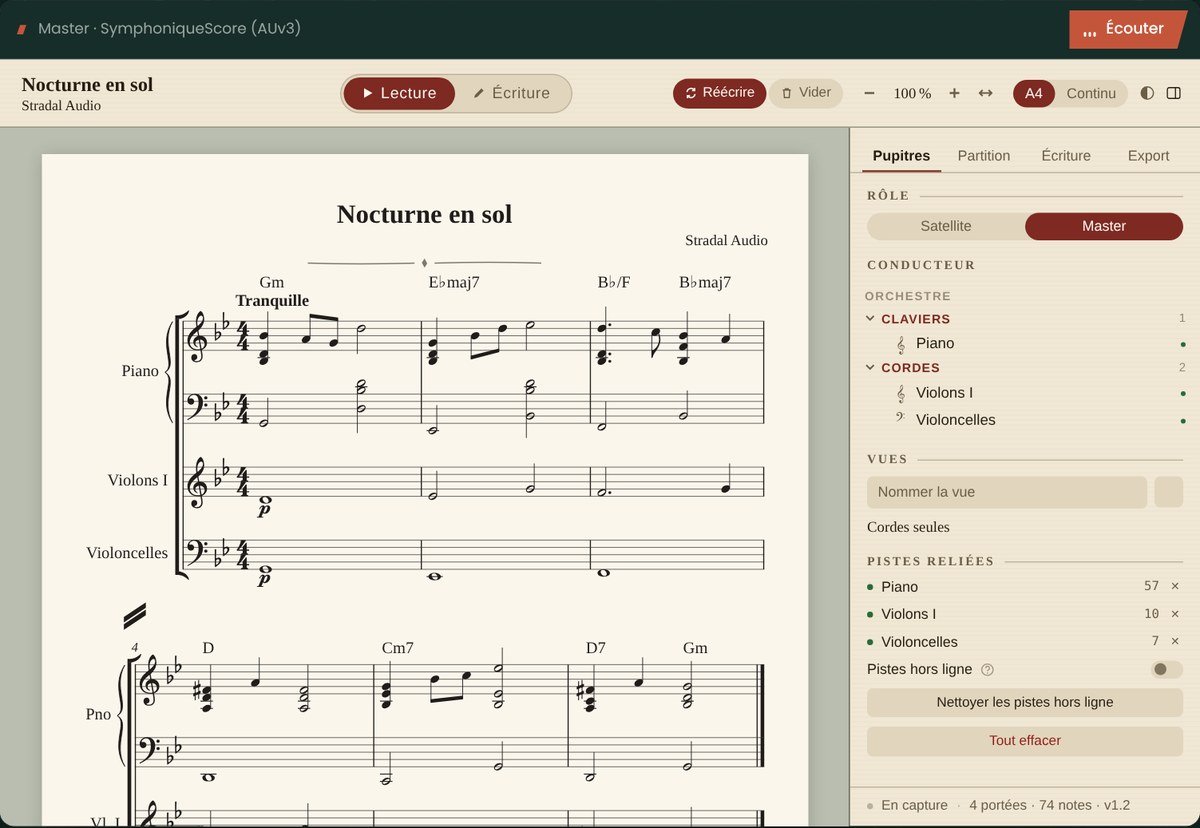
In Stradal Score, each Logic Pro track carries a Satellite instance that captures its notes and declares its instrument. A Master instance reads everything they send and engraves the full score. The Parts panel sorts the linked tracks by family, like Keyboards and Strings in the demo.
- 1
Declare each track's instrument
On each Satellite, choose the track's instrument. The clef and concert pitch are shown under the name, for example "Treble clef · concert pitch" for Violins I.
- 2
Turn on Ignore out of range
Notes the declared instrument can't play, often keyswitches, leave the score.
- 3
Switch one instance to Master
In the Parts tab, choose Master. The full score appears with its families and the Linked tracks list, where each track shows its number of captured notes.
- 4
Lighten it
In the Score tab, turn on "Hide empty staves": instruments that never play disappear from the full score. "Start at the first bar played" avoids empty bars at the start.
- 5
Isolate a family
Clicking a family isolates it on the full score, Shift+click adds another one. The Views block lets you name a view, like "Strings only" in the demo.
- 6
Keep offline tracks in mind
A track whose instance no longer responds stays visible with what it had sent. "Clean up offline tracks" removes them from the full score.
Real plugin options, suggested as a starting point for a first orchestral full score.
| Role | Satellite on each part, Master on one instance | Each track sends, the master engraves |
|---|---|---|
| Instrument on this track | The real part (Violins I, Cellos…) | Gives the clef and the staff |
| Ignore out of range | On | Sets keyswitches aside |
| Hide empty staves | On | No staff for a silent instrument |
| Chord symbols | As needed | Handy for a working score, often removed for a conductor |
| Display | A4 to proofread, Continuous to follow playback | The printed page or a scrolling roll |
Frequently asked questions
Should a full score be in concert pitch or transposed?
Both are done. Concert pitch is simpler to read and very widespread, especially in film music. The transposed full score remains the classical tradition. Ask the conductor, and in every case provide separate parts transposed for transposing instruments.
Why are the horns above the trumpets?
It's a historical full score tradition, tied to the horns' place between woodwinds and brass in the classical orchestra. Even though the horn sounds lower than the trumpet, the practice is still to put it at the top of the brass.
One track per instrument, even for two flutes playing together?
In the project, yes, it's the safest. When engraving, you can group flutes 1 and 2 on one staff in your notation program, with the a2 marking when they play in unison.
Keyswitches show up on my score, how do I remove them?
Delete them from the regions or move them to a separate track before exporting. In Stradal Score, the Ignore out of range option removes from the score the notes the declared instrument can't play.
Can you make the separate parts from Logic?
Logic's score editor can display parts, but for complete orchestral parts, with cues and multi-bar rests, most composers export MusicXML to MuseScore, Dorico or Sibelius and finish there.
Updated on October 22, 2026.