Why a generated score always needs proofreading
An automatic conversion makes choices for you, and it makes them with what it has: note starts and ends, velocities. It doesn't know you were thinking "singing" on this phrase, or that the short note in bar 12 was an intended staccato and not a hurried finger.
Proofreading in a single pass, looking for everything at once, is the best way to miss things. The method that works: one layer at a time, from the most objective (rhythm) to the most interpretive (phrasing).
Proofreading in six layers
- 1
Rhythm
Tap each bar as you read. Look for odd values: tied thirty-second notes, isolated sixteenth rests, triplets turned into dotted eighths. They almost always come from quantization that's too fine or missing.
- 2
Note spelling
Check the key signature and accidentals. A leading tone in minor is written as a sharp or a natural, not as a flat of the note above. A rising chromatic line is usually written in sharps, a falling one in flats.
- 3
Slurs and ties
Separate ties (two notes of the same pitch merged into one) from phrase slurs (a group of notes played in a single breath or a single bow).
- 4
Dynamics
Place a dynamic at the start of each section and at each real change. Add crescendo and decrescendo hairpins where the music rises or falls back.
- 5
Articulations
Staccato, accent, tenuto, marcato: only where they change something. An articulation on every note no longer signals anything.
- 6
Pedal and playing techniques
Piano pedal, pizzicato, arco, mute. These are technical instructions that MIDI almost never contains in a readable form.
The mistakes that come up most often
- Notes cut into tied pieces in the middle of a beat: a simple value like a dotted quarter is written as an eighth tied to a quarter. Rewrite it as a single sign when the meter allows.
- Useless rests between two notes played legato, because the key was released a little early. Lengthen the first note up to the second.
- Chords in a monophonic part (flute, violin, voice) because of overlapping notes. Keep only one note at each moment.
- Beams that hide the beats: in 4/4, a group of eighths must show the middle of the bar. Group by beat or by half bar.
- A missing tempo marking: MIDI knows the tempo in numbers, but not the character. Add "Tranquillo", "Allegro" or whatever describes your intention.
Phrase slur or tie?
Both have the same shape, an arc, and that's the source of a lot of confusion in scores coming from MIDI. The tie joins two notes of the same pitch: you don't replay the second, you hold it. It's purely rhythmic, and the software places it on its own when a note crosses a barline. The phrase slur covers notes of different pitches and says "play this group connected, in one gesture".
Software can guess a legato when notes overlap slightly in the MIDI. But where the phrase starts and ends is music, not measurement. Read aloud or sing: where you breathe, the slur ends.
Turning velocities into dynamics, carefully
Many tools offer to convert velocities into dynamics. It's useful as a draft. The trap: a velocity isn't a dynamic. An mf on solo violin and an mf in an orchestral tutti aren't played with the same strength, and your sample library may have been played with high velocities everywhere to get more bite.
Approximate correspondences often used by notation software to play back dynamics. They vary from one program to another: use them to spot the broad zones, not to decide note by note.
| pp | Around 30 | Very soft, often a color more than a volume |
|---|---|---|
| p | Around 50 | Soft |
| mp | Around 65 | Moderately soft |
| mf | Around 80 | The "default" dynamic of many passages |
| f | Around 95 | Loud |
| ff | Around 110 | Very loud, to keep for real peaks |
The right approach: look at the trend of the velocities over several bars, not each note. A steady rise becomes a crescendo hairpin. A plateau becomes a dynamic. If your velocities are all identical because the MIDI was programmed with the mouse, the problem is upstream: see why MIDI sounds robotic.
Articulations: what each one asks for
| Sign | Name | What the musician does |
|---|---|---|
| Dot above or below the note | Staccato | Shortens the note, detached from the next |
| Small horizontal line | Tenuto | Holds the note for its full value, with a slight stress |
| Sideways chevron (>) | Accent | A stronger attack than the surrounding notes |
| Upright chevron (^) | Marcato | A stronger accent, often shorter |
For strings, also think about playing techniques: pizzicato (plucked string) is written "pizz." at the start of the passage and "arco" when the bow comes back. On piano, the sustain pedal is marked under the bottom staff, with a start sign and a release sign, or a continuous bracket.
With Stradal Score: writing by hand
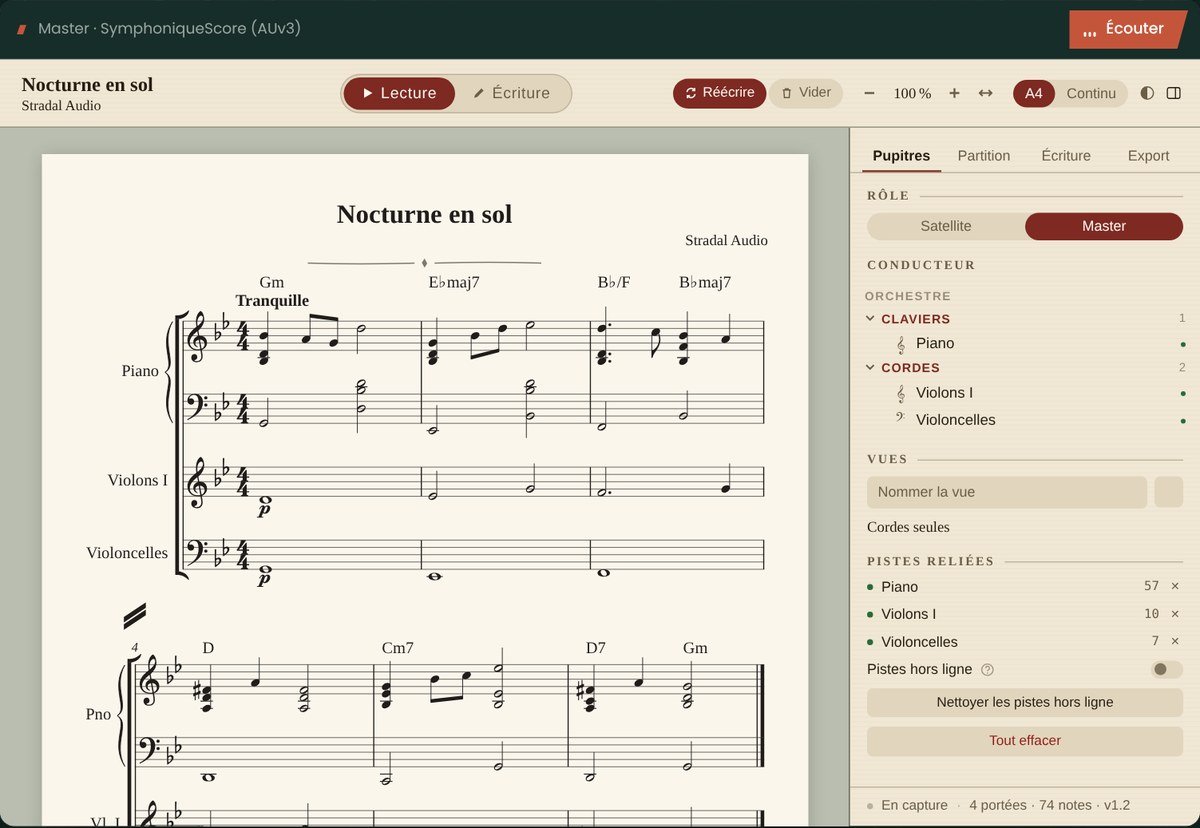
In Stradal Score, the engraving can already suggest a draft: the Auto dynamics and legato option, in the Score tab, turns velocities into dynamics and hairpins, and overlapping notes into slurs. The rest is done by hand, in Edit mode.
- 1
Freeze playback
Turn off Rewrite: the score is frozen and playback no longer touches it while you edit. Switch to Edit mode at the top of the interface.
- 2
Select a note
Click a note on the score. Shift+click another note selects the whole range. The up and down arrows move the pitch by a semitone, handy for a wrong note.
- 3
Place the marks
In the Marks block, choose an articulation (staccato, accent, tenuto, marcato) or a dynamic from pp to ff.
- 4
Place the ranges
A range needs at least two notes: click the first, Shift+click the last, then choose Phrase slur, Tie, Crescendo, Decrescendo or Sustain pedal.
- 5
Set the track's playing technique
Normal, Legato, Détaché, Pizzicato or Marcato. Legato places the phrase slurs, Détaché a staccato on each note, Pizzicato the marking at the start.
- 6
Fix key or meter at a given bar
Select a note in the bar to change: the change applies from that bar on. At bar 1, it becomes the value for the whole score.
Real plugin options, in the order to use them. A starting point, not a recipe.
| Auto dynamics and legato | On for a first draft, then proofread | Velocities to dynamics and hairpins, overlaps to slurs |
|---|---|---|
| Rewrite | Off while editing | The score is frozen, playback no longer touches it |
| Playing technique (track) | Normal, unless a whole section is détaché or pizzicato | Avoids placing a mark on every note |
| Selection | Click, then Shift+click for a range | Needed for slurs, hairpins and pedal |
Frequently asked questions
Can you trust the automatic conversion of velocities into dynamics?
As a draft, yes. As a final version, rarely. A velocity depends on your playing and the sound library, a dynamic depends on the musical context. Keep the broad trends and rewrite the details.
How do you know whether an arc is a phrase slur or a tie?
Look at the pitches. Two identical notes joined by an arc: a tie, you don't replay the second. Different notes under an arc: phrasing, you play them connected in one gesture.
Should you put a dynamic in every bar?
No. A dynamic holds until the next one. Place one at the start of each section and at each real change, then use hairpins for gradual changes.
Why do my corrections disappear when I export again from the sequencer?
Because most marks added in a notation program don't go back into the MIDI. Fix rhythm and notes in the project, then add the performance marks last, in the software that produces the final version.
Which marks can you add by hand in Stradal Score?
Articulations, dynamics from pp to ff, phrase slurs, ties, crescendo and decrescendo hairpins, sustain pedal, and one playing technique per track: Normal, Legato, Détaché, Pizzicato or Marcato.
Updated on November 23, 2026.