
The anatomy of a boom
What the ear hears as a single hit is actually a very short stack of different sounds. Each one has a length, a frequency range and a job.
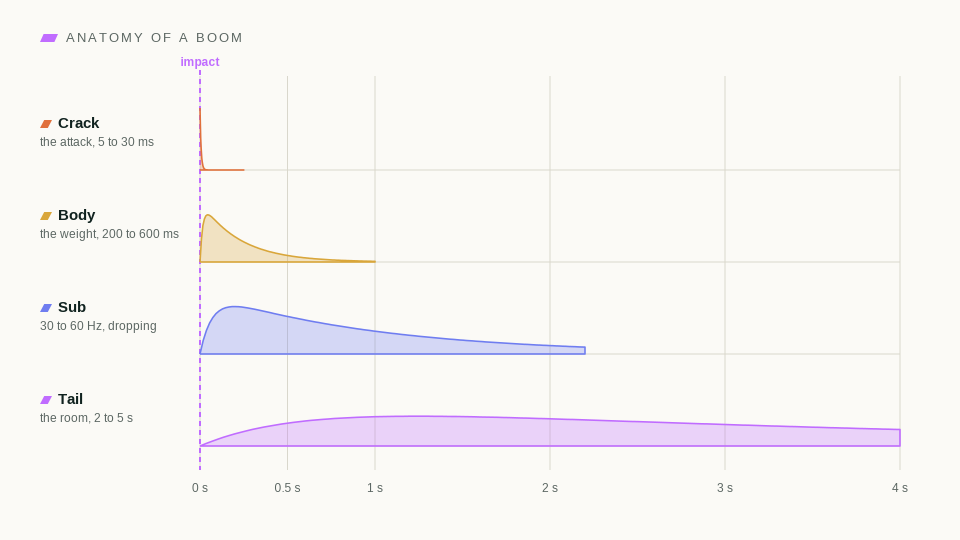
| Layer | Length | Frequencies | Job |
|---|---|---|---|
| Crack | 5 to 30 ms | 2 to 10 kHz | the attack, audible on a phone |
| Body | 200 to 600 ms | 60 to 300 Hz | the weight, the “drum” |
| Sub | 1 to 3 s | 30 to 60 Hz | the vibration you feel |
| Tail | 2 to 5 s | 200 Hz to 6 kHz | the room, what carries on |
Step 1: a crack for the attack
This is the most forgotten layer, and it’s what makes a boom “crack” instead of “blow”. A few milliseconds of bright sound: a whip crack, a processed handclap, a very short metal hit, white noise with a tight envelope. On small speakers, it’s almost all you’ll hear of the boom.
Step 2: a body for the weight
A big drum (orchestral bass drum, taiko), a hit on a metal sheet, a distant explosion or a very deep kick, shortened. The body sets the perceived pitch of the boom and its material. It must decay in under a second, or it covers what follows.
Step 3: a falling sub
A sine wave (or close to one) between 30 and 60 Hz whose pitch drops slightly at the start: that glide is what gives the feeling of a physical blow. Tune it to the key of the track, keep it in mono and give it a soft attack to avoid a click. The tutorial making a sub drop details its curve.
Step 4: a tail for what follows
The resonance in a big hall carries the boom into the next scene. Put the reverb on the body and the material, not on the sub or the crack, and cut its low end below 150 to 200 Hz. A 2 to 5 second tail is enough; longer, and it blends into the next boom.
Step 5: the silence before the hit
A boom sounds twice as loud when it comes out of a void. Cut everything (music included, or almost) 60 to 250 ms before the hit. It’s the simplest and most effective rule in trailers.
Making a boom in Nebula
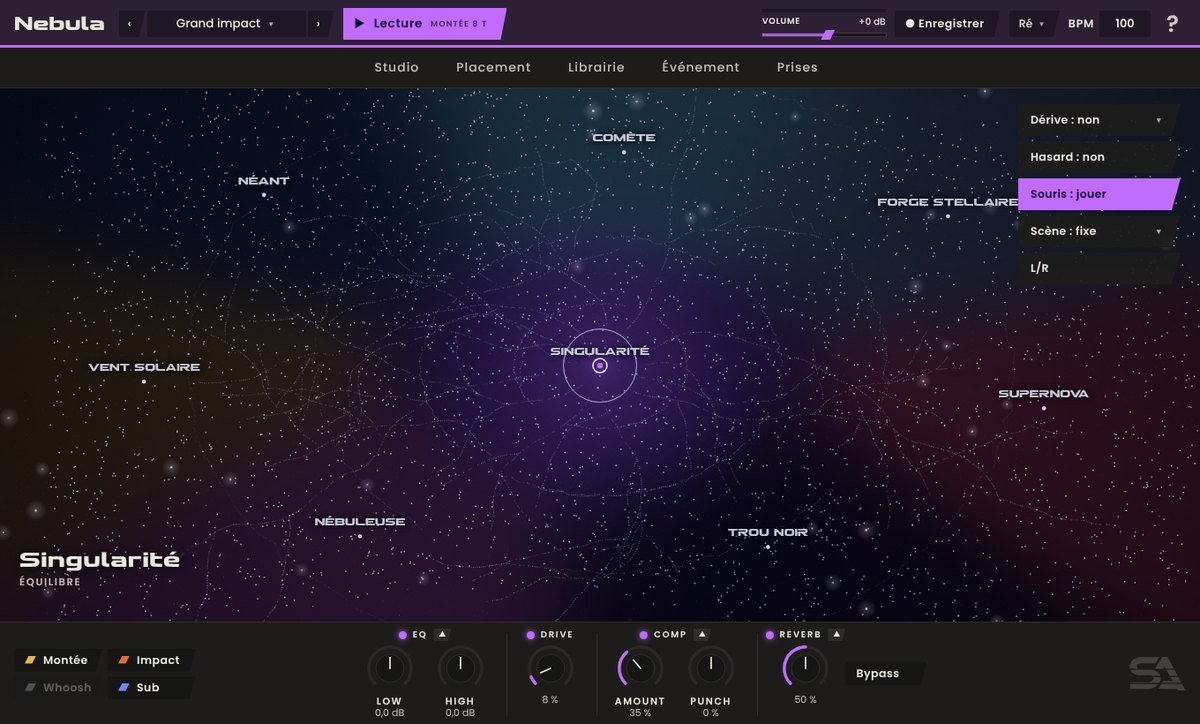
In Nebula, open the Event view: the Composite Impact offers the material (metal, wood, stone, glass, skin, earth, electric, synthesis, explosion), its variant, then the attack, the body and the tail. Each choice places its layer and plays the result. Add a Sub (Subs family: Boom, Falling sub, Rumble): it starts from the impact and follows the chosen Key.
For a darker boom, drag the point towards Black Hole; for a more metallic one, towards Stellar Forge.
| Setting | Value | Why |
|---|---|---|
| Composite Impact: material | explosion or metal | The character of the hit |
| Layer mix: Impact | +30 to +60% | Sharper attacks |
| Layer mix: Sub | +3 to +6 dB | A tuned sub hit under the attack |
| Key | the key of the track | The sub and tuned booms follow |
| Comp: Punch | high | The crack comes forward |
| Reverb: Tail | opens on the impact | The room opens on the hit |
Variations: braam, reverse boom, horror boom
- The braam: a boom carried by saturated low brass that holds for a second or two. Replace the tail with a very low brass chord and a little Drive.
- The reverse boom: the tail played backwards just before the hit creates a suck-in. Line up its end exactly with the impact.
- The horror boom: less top end, a longer sub, a dark room and a longer silence before. Fear comes from the wait.
Frequently asked questions
How do I make a boom more powerful without turning it up?
Add a short crack for the attack, leave 60 to 250 ms of silence before the hit and keep the sub in mono. Perceived power comes from contrast and attack, not from level.
What frequency should a boom’s sub be?
Between 30 and 60 Hz, tuned to the key of the track. A slight pitch drop at the start gives the feeling of impact.
Should I put reverb on a boom?
Yes, but only on the body and the material, with the reverb’s low end cut. Reverb on the sub or the crack softens the hit.
What’s the difference between a boom and a braam?
A boom is a short hit carried by the low end and a room. A braam is a held note of saturated low brass, made famous by trailers in the 2010s.
Updated on November 23, 2026.