Before you start: listen in the right way
Listen to the mix at low volume, then in mono, then on a small speaker. Low volume reveals the balance, mono reveals phase and width problems, the small speaker reveals the mids. Write down what bothers you before touching anything, then look for the cause in the list below.
1. Several different Reverbs
Symptom: the orchestra sounds like a collage, each family in its own room. Cause: a different Reverb on each track, or the one built into each sample library, all left on. Fix: a single hall for everyone, then vary the wet amount with distance. See choosing the hall.
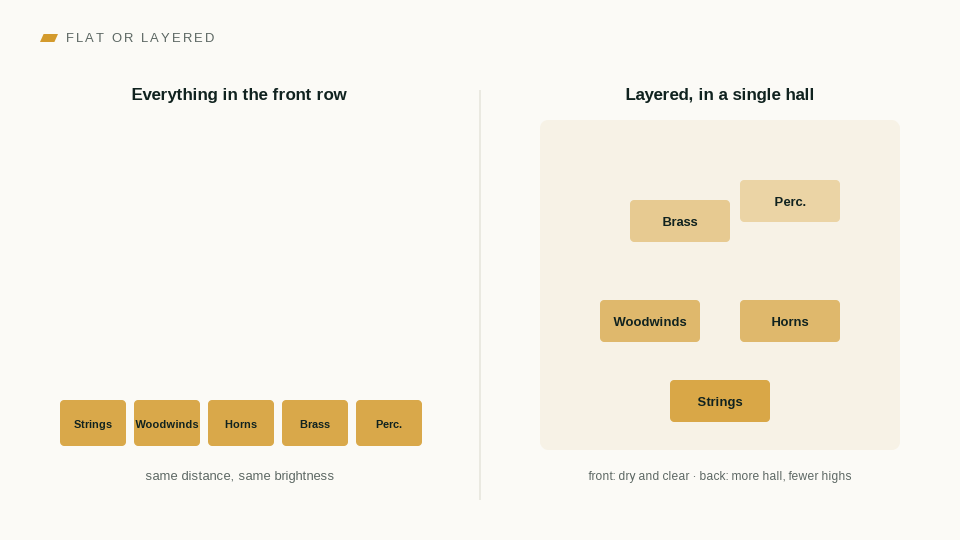
2. Every section at the same distance
Symptom: the orchestra is flat, with no front or back. Fix: layer it on three planes. Strings in front (little Reverb, strong Early reflections), woodwinds and horns in the middle, trumpets, trombones and percussion at the back (more Reverb, fewer highs, weaker Early reflections). The guide on mixing an orchestra covers each plane in detail.
3. Low end piling up
Symptom: the mix is muddy, heavy, and gets confusing as soon as everyone plays. Cause: every track adds a bit of useless low end (violins, violas, woodwinds, Reverbs). Fix: a Low cut on each instrument above its lowest note (around 150 to 200 Hz for violins, 100 Hz for violas), and a Low cut on the send to the hall around 80 to 120 Hz.
4. Brass stuck to the speakers
Symptom: the brass crush everything and sound aggressive. Cause: samples recorded up close, left dry. Fix: push them back (more Reverb, fewer highs, weaker Early reflections) instead of turning them down. Distant brass stays powerful without being harsh.
5. Speaker panning, not a stage
Symptom: the instruments are “in” the speakers, hard left or hard right. Fix: recreate the seating plan, with moderate positions (rarely beyond 60% on each side), and make the Early reflections follow: a section placed on the left should also have its echoes coming from the left. See placing instruments on the stage.
6. Setting levels before space
Symptom: you keep raising faders, nothing is ever balanced. Cause: a section that's too close seems too loud, a drowned section seems too quiet. Fix: set the distances first, only then the levels. Often, half of the level corrections become unnecessary.
7. Too much Reverb to sound “big”
Symptom: the mix is blurry, the attacks disappear. Fix: size comes from the Early reflections and the layering, not from the length of the Tail. Shorten the hall (around 2 to 2.5 s for a large concert hall), lower the Tail, keep the Early reflections.
8. Identical velocities everywhere
Symptom: even well placed, the orchestra sounds mechanical. Cause: it's not a mixing problem, but it ruins the mix. Fix: vary velocities and expression, phrase by phrase. See humanizing MIDI.
9. Crushing the master to gain volume
Symptom: the tutti no longer grows, pianissimo and fortissimo have the same level. Fix: an orchestra needs its dynamics. Aim for light compression on the bus (1 to 2 dB) and a Limiter that only catches the peaks. Accept a lower average level than in pop music.
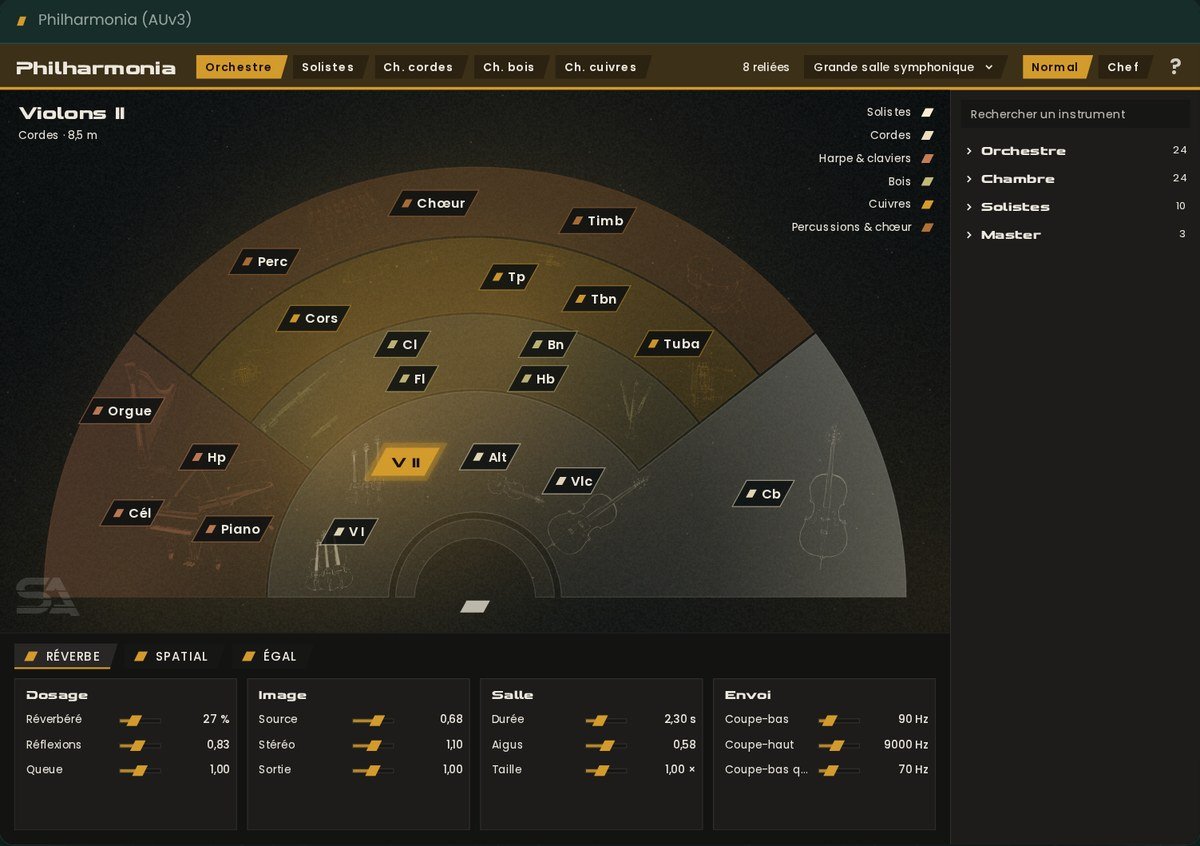
With Philharmonia: fixing it at the source
Philharmonia tackles the first four mistakes at once. Each track gets an instance, and they all share the same hall (five halls to choose from). You place the section on a seating plan, in meters around the conductor: the wet amount, the Early reflections, the pan and the distance-related tone correction follow the position. The send filters remove the lows and extreme highs before the hall.
Frequently asked questions
Why does my virtual orchestra sound flat?
Almost always because every section is at the same distance, often with different Reverbs. A single hall and three-plane layering (strings, woodwinds and horns, brass and percussion) solve most of it.
How do you make an orchestral mix less muddy?
Cut the useless low end of each section above its lowest note, filter the low end sent to the Reverb, and avoid stacking long Reverbs.
Should you compress an orchestra?
Very little: 1 to 2 dB on the bus, and a Limiter for the peaks. Dynamics are an essential part of the orchestral sound.
Where should you start to improve an orchestral mix?
With space: a single hall, then the distances. Levels come next, and many level problems disappear once the distances are right.
Updated on October 30, 2026.